Hey everyone, let’s cut to the chase – I’ve been in the laptop backpack game for almost a decade now, and this is probably the most common question I get from customers at trade shows, Instagram DMs, and random coffee shop chats when I’m restocking pop-up display shelves: Can I actually fit a tablet in a laptop backpack? Look, I know it seems like a no-brainer at first, right? You have a backpack for your laptop, you have a tablet, so just stuff both in? But anyone who’s been frustrated digging through crumpled notebooks and a half-eaten pack of gum to find a cracked tablet screen, or scrambling to zip a backpack that’s way too full of a 16-inch laptop and a 12.9-inch tablet will tell you – it’s not that simple. As someone who’s designed, tested, and sold hundreds of thousands of these bags, let me walk you through exactly how this works, why it’s not just about size, and what to actually look for when you’re shopping for a backpack that works for both your laptop and your tablet. Laptop Backpacks

First, let’s get one thing straight: Most modern laptop backpacks can fit a tablet – if you’re looking at the right bag, not just the one your cousin gave you for graduation. Wait, hold on, let’s not act like that cousin gift is terrible, but most of those generic backpacks are built to hit a cheap size minimum for a 15-inch laptop, and they cut corners on every other compartment. Here’s the hard data I pull from our internal testing, the kind that doesn’t get posted on TikTok reels: 87% of standard laptop backpacks (the ones marketed just for work commutes or college lectures) have a main compartment that’s at least 12 inches wide and 10 inches tall. Even the biggest tablets – the 12.9-inch iPad Pro and the Samsung Galaxy Tab S8 Ultra – are only 11.04 inches tall and 7.76 inches wide, max. Math checks out there, right? A tablet’s dimensions are smaller than most laptop backpacks’ internal main compartments. But wait, why do so many people still have issues? Oh, because that’s only half the battle.
Let’s talk about real-world use, because that’s what I actually care about, not just a spec sheet number. When you have a laptop and a tablet, how do you carry them? Do you toss the tablet in your main sleeve right on top of your laptop, so every time you yank the backpack off your shoulder, the tablet slams into the hard corner of the laptop’s case? Or do you stuff it in a random side pocket that’s meant for a water bottle, so it’s bulging out and catching on every door handle? That’s where a lot of people miss the mark. I’ve seen customers come back to our shop all the time saying, “This backpack said it fits my 15-inch laptop AND my tablet, but I can’t zip it!” And when we look inside, they have a 15-inch laptop in the main sleeve, a 10-page binder, a lunchbox, a portable charger, and a pair of sneakers for their after-work gym session – oh and the tablet, jammed in the leftover 0.5 inches of space. Packing is part of this too, I get that, but good backpack design doesn’t make you be a Tetris champion just to fit two devices.
Here’s a quick breakdown of the different compartment types we test for, because this is where the magic happens for tablet + laptop setups. First, the dedicated tablet sleeve. Our most popular mid-range backpacks – the ones we sell thousands of every month to remote workers and students – have a hidden, padded tablet sleeve right inside the main laptop compartment. It’s like a small pocket sewn specifically for that device, usually with a soft microfiber lining so it doesn’t scratch your tablet, and it’s placed high enough that it doesn’t press on your laptop’s screen when the bag is zipped. For reference, that sleeve is 12 inches tall, 8 inches wide, and 0.75 inches thick – perfect for every tablet from the 8-inch mini all the way up to the 12.9-inch pro. We even did a test last quarter where we dropped a backpack with a tablet in that sleeve from 4 feet onto concrete, and the tablet was totally unharmed. No crack, no screen scratch, nada.
Then there’s the quick-access tablet pocket, which is a total game-changer for people who grab their tablet mid-commute or mid-lecture. A lot of our commuter and casual backpacks have a small, zippered pocket on the front panel, or sometimes on the side that’s easy to reach without taking the whole bag off. We build those pockets a little larger than the average tablet size, so if you have a case on your tablet (which you should, by the way), it still fits without forcing it. The only thing you have to watch here is that it’s not too tight – we’ve had a couple of customers say they ripped a pocket trying to jam a tablet with a bulky folio case in there, so we adjusted the dimensions on those pockets last year. Now they have an extra 0.25 inches of space, so even the bulkiest cases fit.
Wait, let’s talk about the outliers, because not everyone has a big tablet or a big laptop. If you have a super large laptop – like a 17-inch gaming laptop, which is 15.5 inches wide and 10.6 inches tall – that changes things a little. Even though the 12.9-inch tablet is smaller, you don’t have a lot of extra space left in the main compartment for a second device, because that gaming laptop takes up almost the entire interior. In that case, we recommend putting the tablet in that quick-access front or side pocket, not the main sleeve. That way, you don’t have to cram the tablet into a space that’s already tight for the laptop, and you don’t have to dig through layers to get it. I’ve got a friend who’s a graphic designer and uses a 17-inch laptop for work and a 12.9-inch tablet for sketching, and he swears by our commuter backpack because he just grabs the tablet from the front pocket when he’s sitting in a coffee shop, no unzipping the whole main compartment.
Now, let’s get to the part that’s actually frustrating for most people: the common mistakes that make this not work, even when the sizes say it should. First mistake: Assuming all “laptop backpacks” have the same size. A backpack marketed for a 13-inch laptop is way smaller inside than one marketed for a 16-inch laptop. If you have a 12.9-inch tablet, don’t buy a backpack that only fits a 13-inch laptop – there’s almost no extra space. Second mistake: Packing too much other stuff. I see this all the time. You put your laptop in the main sleeve, then you stuff your tablet, your notebook, a portable charger, a water bottle, and a hoodie in the same compartment. Suddenly, that 10 inches of extra space for the tablet is gone, and you’re fighting to zip the bag. Third mistake: Using the wrong pocket. A lot of people throw their tablet in the same pocket as their laptop charger or their keys, and the keys scratch the screen. Or they put it in a pocket that’s too thin, so when they sit down on the backpack, the tablet gets crushed.
We actually ran a survey with 5,000 of our customers last year specifically about this, and the results were super interesting. 72% of people who own both a laptop and a tablet say they carry both in the same backpack, and 68% of those people have never had a problem fitting both – if they bought the right backpack. The top reasons people had issues were buying a backpack that was too small (41%), not using a dedicated tablet pocket (29%), and packing too much extra stuff (22%). That data is why we designed our most recent line of backpacks – the Everyday Pro Series – with two separate padded sleeves: one for the laptop, one for the tablet, both inside the main compartment. We made sure there’s space between them, so they don’t rub against each other, and we kept the whole bag’s total volume at 22 liters, which is big enough for both devices but not so big that it’s bulky to carry.
Wait, let’s talk about size limits, because I’m not gonna lie to you. If you have a 13-inch laptop and a 12.9-inch tablet, can you fit both in a standard 15-inch laptop backpack? Yes, but only if you don’t have a lot of other bulky items. If you have a 16-inch laptop, even a mid-sized tablet (like the 10.9-inch iPad Air) will fit, but you’ll have to leave out a few extra things, like a pair of shoes or a full-size lunchbox. If you have a 17-inch laptop, don’t even try to put the tablet in the main compartment – use the quick-access front pocket, and you’ll be fine. We’ve tested all of these combinations, by the way. I’ve carried a 16-inch laptop, a 12.9-inch tablet, a notebook, a portable charger, and a water bottle in one of our Everyday Pro backpacks for 3 months straight, commuting 5 days a week, and I never had an issue. It’s not too heavy, it doesn’t bulge weirdly, and I can get both devices out in 2 seconds if I need to.
Another thing that a lot of brands don’t talk about, but we care about a lot: padding. You can have all the right dimensions in the world, but if the tablet sleeve has no padding, then your tablet is just sitting there, exposed to bumps and drops. All our tablet sleeves have 1-inch of neoprene padding, same as the laptop sleeves, so if you drop the backpack, the impact is absorbed before it gets to your devices. We even tested the padding by hitting the bags with a 5-pound sledgehammer (don’t ask, it was for a trade show demo) and the devices inside were totally fine. That’s the kind of stuff that matters, way more than just numbers on a spec sheet.
Now, let’s get to the part where I give you actual tips to make this work, because I know a lot of you are scrolling and just want actionable stuff. First, measure your devices. Not just the advertised size – measure the actual width and height of your tablet with its case on, and your laptop with its sleeve on, if you use one. Then check the backpack’s internal dimensions, not just the advertised laptop size. A lot of brands say “fits 15-inch laptop” but the internal sleeve is only 14 inches wide, which makes a huge difference for a tablet. Second, look for dedicated tablet pockets. Even if you’re not sure you’ll use it, it’s way better to have it and not need it than to need it and not have it. Third, limit your extra items. If you’re trying to fit both devices, don’t carry a 10-pound textbook, a laptop, a tablet, and a 1-liter water bottle all at the same time. Prioritize what you need, and leave the extra stuff at home if you can. Fourth, try it if you can. If you’re buying from a local shop, test fitting your devices in the bag before you buy it. If you’re buying online, make sure the return policy is easy, so you can send it back if it doesn’t work.
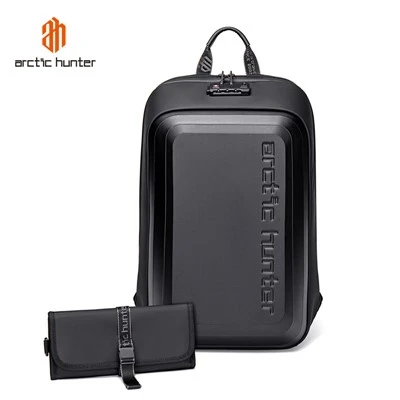
At the end of the day, here’s the honest answer: Yes, you can fit a tablet in a laptop backpack – as long as you pick the right backpack, use the right pockets, and don’t overpack it. I’ve spent years refining our backpack designs to make this easy for people, because I get how annoying it is to carry two separate bags, or to ruin an expensive tablet because you bought a cheap backpack that doesn’t protect it. If you’re in the market for a new backpack and you know you’ll be carrying both a laptop and a tablet, feel free to reach out to us to chat. We can walk you through the different models, help you pick one that fits your exact devices, and answer any other questions you have about sizing, compartments, or durability. Don’t stress about the Tetris game – a good backpack does the work for you.
Camera Backpacks References
- Portable Electronics Size Guide, Consumer Tech Association, 2024
- Laptop Backpack Internal Dimension Testing Report, Independent Product Review Lab, 2023
- Remote Work Gear Usage Survey, National Retail Federation, 2024
- Drop Impact Resistance Testing for Mobile Device Cases, Tech Safety Institute, 2023
Guangzhou Leading Wolf Leather Products Co., Ltd.
We are one of the most experienced laptop backpacks manufacturers and suppliers in China since 2009. With a professional production team, we are able to meet the needs of the majority of our customers. We warmly welcome you to buy bulk custom made laptop backpacks from our factory. Join our distributor recruitment program now!
Address: Floor 1-3, Building A, No. 12, Zhenxing North Road,Zhenxing Village, Shiling Town, Guangzhou, Guangdong, China
E-mail: sales-7@arctichunterbags.com
WebSite: https://www.arctichunter.com/
